7. PDF printing
eFakturaWin generates PDF documents directly — without an external PDF printer, without a preview, without MS Word or LibreOffice. With one click you get a finished PDF that opens in the default Windows PDF viewer.
7.1. How to print
There are three ways:
- From the invoice list — select one or more rows and click Print. A PDF is made for each selected invoice.
- From the pro-forma invoice list — likewise, click Print. A PDF for each selected pro-forma invoice.
- Right click in the grid → "Print to PDF".
The PDF file opens immediately after creation in your default PDF viewer (Adobe Reader, Foxit, Edge, Chrome, etc.).
7.2. Where PDF files are saved
PDF documents are saved in the same folder as eFakturaWin.exe with a predictable name:
| Type | File name |
|---|---|
| Domestic invoice | Faktura_<number>.pdf |
| Export invoice (partner outside MK) | Invoice_Export_<number>.pdf |
| Pro-forma invoice | Profaktura_<number>.pdf |
| Downloaded UJP-generated invoice 🚧 | Faktura_UJP_<number>.pdf |
Warning
With the same invoice number, the PDF file is overwritten on a re-print. If you want to keep an old version, move or rename it before printing again.
Tip
For a tidy archive, we recommend periodically moving all Faktura_*.pdf files into a subfolder by year (e.g. pdfs/2026/).
7.3. PDF structure
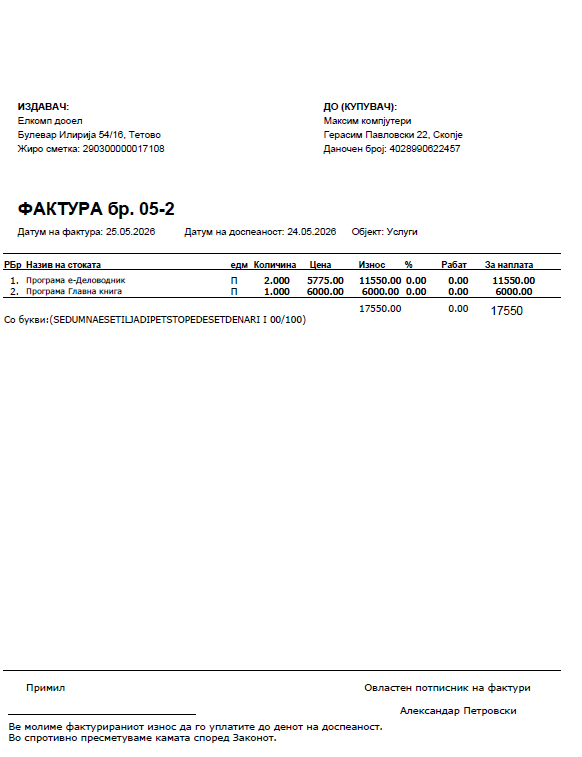
A standard PDF has the following sections, from top to bottom:
Header
- Top left: Issuer's logo (if set in the profile) — approximately 100×20 mm.
- Below the logo, left: Issuer (name, address, city, EDB, giro account or IBAN/SWIFT for export).
- Below the logo, right: Buyer (name, address, city, EDB).
Title
A large (18 pt, bold) heading:
- "INVOICE no. A-48" for an invoice (prefix "A-" from the site + integer BR_FAK, per-year sequence)
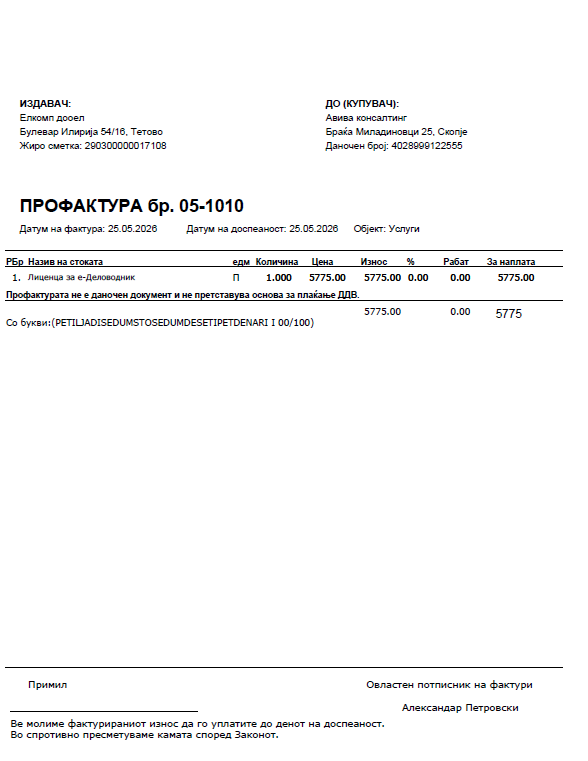
- "PRO-FORMA INVOICE no. P-2026/12" for a pro-forma invoice (free-form text)
- "INVOICE No. A-48" for an export invoice
Below the title: issue date, due date, site, and (for export) currency.
Additional identifiers
If populated — these appear: - Delivery note number and date - Work order number and date
Items table
| Column | Content |
|---|---|
| No. | Sequence number |
| Item description | Description (multi-line — wraps at 39 characters) |
| UoM | Unit of measure |
| Quantity | Numeric |
| Price | Unit price (net) |
| Amount | Quantity × Price |
| % | Discount percent |
| Discount | Discount amount |
| VAT % * | VAT rate |
| VAT * | VAT amount |
| Gross price * | Price including VAT |
| Amount due | Final amount to pay |
Columns marked with
*appear only for VAT-registered issuers. Non-VAT issuers and export invoices use a simpler layout.
Tip
The item description automatically wraps onto multiple lines if it is long. The font for the description is one point smaller than the other columns — deliberately, for a nicer look and a higher text density.
Final totals
Below the table: - Base without VAT (for VAT-registered issuers) - Subtotal per VAT rate - VAT - Amount due — final amount, with the currency for export invoices
"In words"
For domestic invoices (MK): the amount due is written in words in Macedonian (e.g. "In words: (nine thousand three hundred denars)"). This is a legally desirable form for invoices.
Tip
For export invoices, "in words" is skipped (the English translation is not implemented).
Clause
If you chose a clause on the invoice form, its three lines appear here.
Signature and footer
- "Received: ______" (left)
- "Authorised signatory of invoices:
" (right) - A horizontal line
- Two footer rows from the issuer profile (domestic invoices only)
- Optional: image
Podnozje.jpg(stamp, seal) if present in the same folder (domestic invoices only) - Page number (e.g. "1/2")
Slightly different layout for a pro-forma invoice
The pro-forma invoice PDF is almost identical, with two differences:
- The title is "PRO-FORMA INVOICE no. …".
- Above the final totals there is a red note:
A pro-forma invoice is not a tax document and does not constitute a basis for VAT payment.
7.4. Export invoices
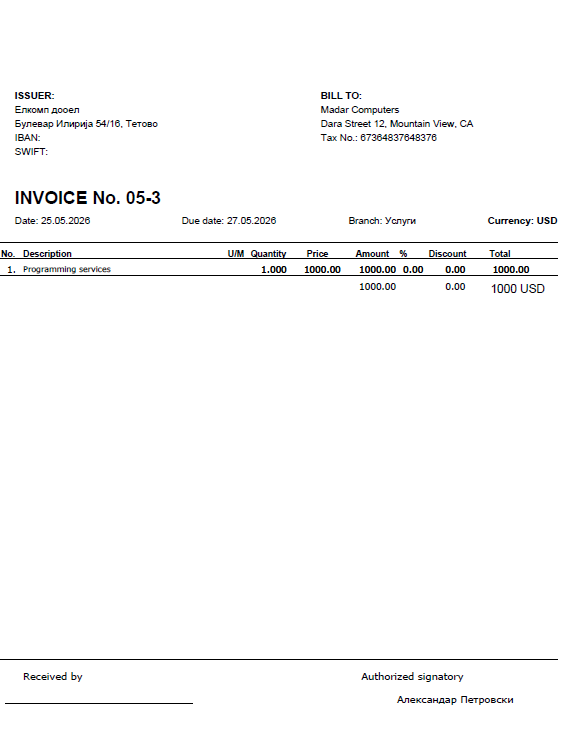
eFakturaWin automatically detects whether an invoice is an export one — by checking the partner's country_code:
- Blank or "MK" → domestic (Cyrillic, VAT, giro account).
- Any other code (DE, IT, US, etc.) → export (English, no VAT, IBAN/SWIFT).
Export invoices:
- Are named Invoice_Export_<number>.pdf.
- All labels are in English.
- No VAT columns — always non-VAT layout.
- Show "Currency: EUR" / "USD" / etc. next to the amount.
- Show IBAN and SWIFT instead of the giro account.
- Skip "in words" (no English translation).
- Skip the footer (the two rows from the issuer profile and the Podnozje.jpg image) — the content is MK-specific and usually irrelevant to the foreign buyer.
7.5. Fonts and Cyrillic
eFakturaWin uses Verdana for the body text and Arial Bold for titles and column headers.
Technical detail
The PDF uses CP1251 (Windows-1251 Cyrillic) encoding — the only verified Cyrillic encoding in hbvpdf. All Macedonian texts are automatically converted from UTF-8 (as stored in the database) into CP1251 at print time. This is transparent to the user, but is the reason why inside clauses and descriptions you should use only Macedonian Cyrillic — other languages on the same line may look odd.
7.6. Common problems
| Symptom | Possible cause | Solution |
|---|---|---|
| PDF does not open after printing | No default PDF viewer in Windows | Install Adobe Reader or set Edge as the default |
| Logo does not appear | Invalid path in the profile | Check in Codebooks → My Company Profile that Logo file holds a valid path |
| Logo looks ugly (stretched, too large) | Image aspect ratio is off | Recommended: 1024 × 736 pixels or a 1.4:1 aspect ratio |
| Cyrillic is missing or falls out | Text contains characters not in CP1251 | Use only Macedonian Cyrillic + ASCII |
| Long item description overflows the column | (Should not — wrap is automatic) | Contact us if it happens; shorten the description |
| Old PDF is overwritten | Same invoice number | Move the old PDF before printing again |
← Back to contents | Previous: Pro-forma invoices ← | Next: CSV export →