4.3. Clause codebook (footer texts)
Clauses are reusable pieces of text that appear on the invoice immediately after the total amount — for example, a legal note, payment terms, a thank-you message, or claim instructions. Their position on the page depends on the number of items: with many items they appear further down, and with only a few they can appear towards the middle. You enter them once and then pick them from a drop-down list when creating each invoice.
4.3.1. Where it opens
From the main menu: Codebooks → Texts / Clauses.
The "Text codebook (Clauses)" window shows a list of all defined clauses for the active issuer.
4.3.2. Clause fields
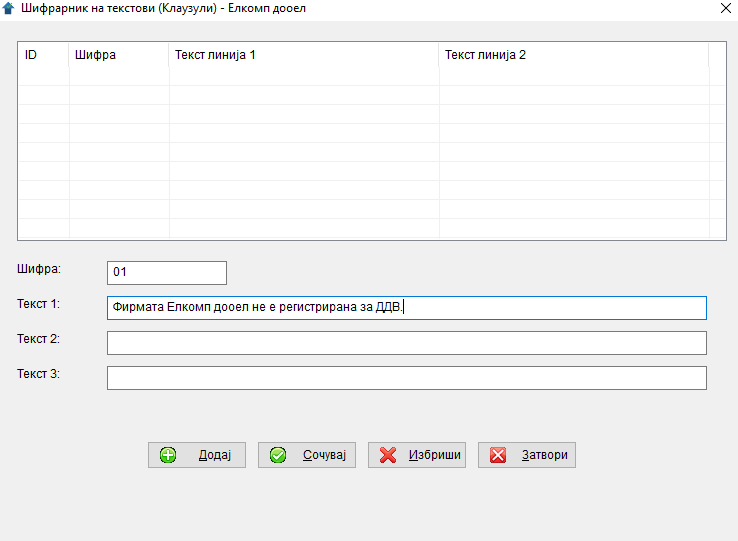
Below the list there are fields for entry/editing:
| Field | Description | Required |
|---|---|---|
Code |
Short code for the clause (e.g. "01", "PLT", "DDV"). Up to 10 characters. | ✅ yes |
Text 1 |
First line of the clause. | no (but at least one line is needed) |
Text 2 |
Second line. | no |
Text 3 |
Third line. | no |
Why three separate lines?
The PDF invoice prints these three strings on consecutive lines below the total. Splitting the text into three lines gives finer control over the visual line break layout.
4.3.3. Buttons
- Add — opens an empty form for a new clause.
- Save — saves the current entry/edit.
- Delete — deletes the selected row from the list.
- Close — closes the window.
Clicking a row in the list loads its fields into the form for editing.
4.3.4. Example clauses
Standard payment clause
| Field | Content |
|---|---|
| Code | PLT |
| Text 1 | Payment due: 30 days from the invoice date. |
| Text 2 | Giro account: 300-0000012345678-90 |
| Text 3 | For clarifications: 02 / 3000-100 |
Export clause
| Field | Content |
|---|---|
| Code | EXP |
| Text 1 | Payment terms: 30 days net. |
| Text 2 | Bank: KOMERCIJALNA BANKA AD SKOPJE, IBAN: MK07300000001234567890 |
| Text 3 | SWIFT: KOBSMK2X |
VAT note (for non-taxable invoices)
| Field | Content |
|---|---|
| Code | DDV0 |
| Text 1 | This invoice is not subject to VAT pursuant to Article 30, point 5 of the VAT Law. |
| Text 2 | (blank) |
| Text 3 | (blank) |
4.3.5. Deleting
You can delete a clause only if no invoice uses it:
This text cannot be deleted because an invoice has been created with it.
As with partners and sites, this is a safeguard against losing the audit trail.
4.3.6. Tips
- 💡 Enter 3–5 typical clauses up front. For example, one for domestic invoices, one for export, one for non-taxable. Later you will just pick them.
- 💡 Use short, memorable codes. "PLT" is better than "01" — when you have 10 clauses, the code helps you find the right text quickly.
- 💡 Keep the text concise. Long paragraphs may not fit on the PDF — the signature section sits below the clauses.
- ⚠️ You can leave an invoice without a clause. When creating an invoice, the clause drop-down has a "blank" option at the top. Select it if you do not want any clause.
← Back to contents | Previous: Sites ← | Next: Issuing an invoice →